
- All
- Product Name
- Product Keyword
- Product Model
- Product Summary
- Product Description
- Multi Field Search
Views: 0 Author: Site Editor Publish Time: 2026-08-07 Origin: Site


Transitioning to a digital workflow for clear aligner treatment is no longer a theoretical advantage. It acts as a baseline requirement for practice scalability. Patients expect modern experiences and inherently trust digital precision. However, clinical decision-makers face a genuine dilemma today. The dental market overflows with intraoral scanners. You will also find endless treatment planning software options and 3D printing ecosystems. This overwhelming noise makes capital expenditure and integration choices incredibly complex. Making the wrong choice often leads to wasted capital and severe operational friction.
Our goal here is simple. We aim to provide a clear framework for evaluating core technical components. You will discover how to select open-architecture tools. We will help you compare in-house setups versus outsourced manufacturing models. Finally, we will outline strategies to mitigate implementation risks. This guidance ensures you maintain clinical predictability while confidently upgrading your daily practice operations.
Traditional analog impressions create significant bottlenecks. Clinicians spend valuable chair time managing messy polyvinyl siloxane materials. Segmented manual planning routinely results in higher operational costs. Patients often experience extreme discomfort during analog impressions. Furthermore, physical shipping creates delayed turnaround times. These delays frustrate patients eager to begin treatment.
To evaluate a transition effectively, you must define clear success criteria. We split these criteria into clinical and business categories.
Clinical Success Criteria:
Business Success Criteria:
Table 1: Analog vs. Digital Impact Comparison
| Evaluation Metric | Traditional Analog Workflow | Modern Digital Workflow |
|---|---|---|
| Impression Accuracy | Prone to material distortion and tears. | Highly accurate; immediate verification on screen. |
| Patient Experience | High discomfort, potential gag reflex triggers. | Comfortable, fast, and interactive. |
| Turnaround Time | 2-4 weeks due to physical shipping and manual labor. | Can be reduced to 24-48 hours in-house. |
| Case Acceptance | Relies heavily on verbal explanation and trust. | Highly visual; simulations drive immediate excitement. |
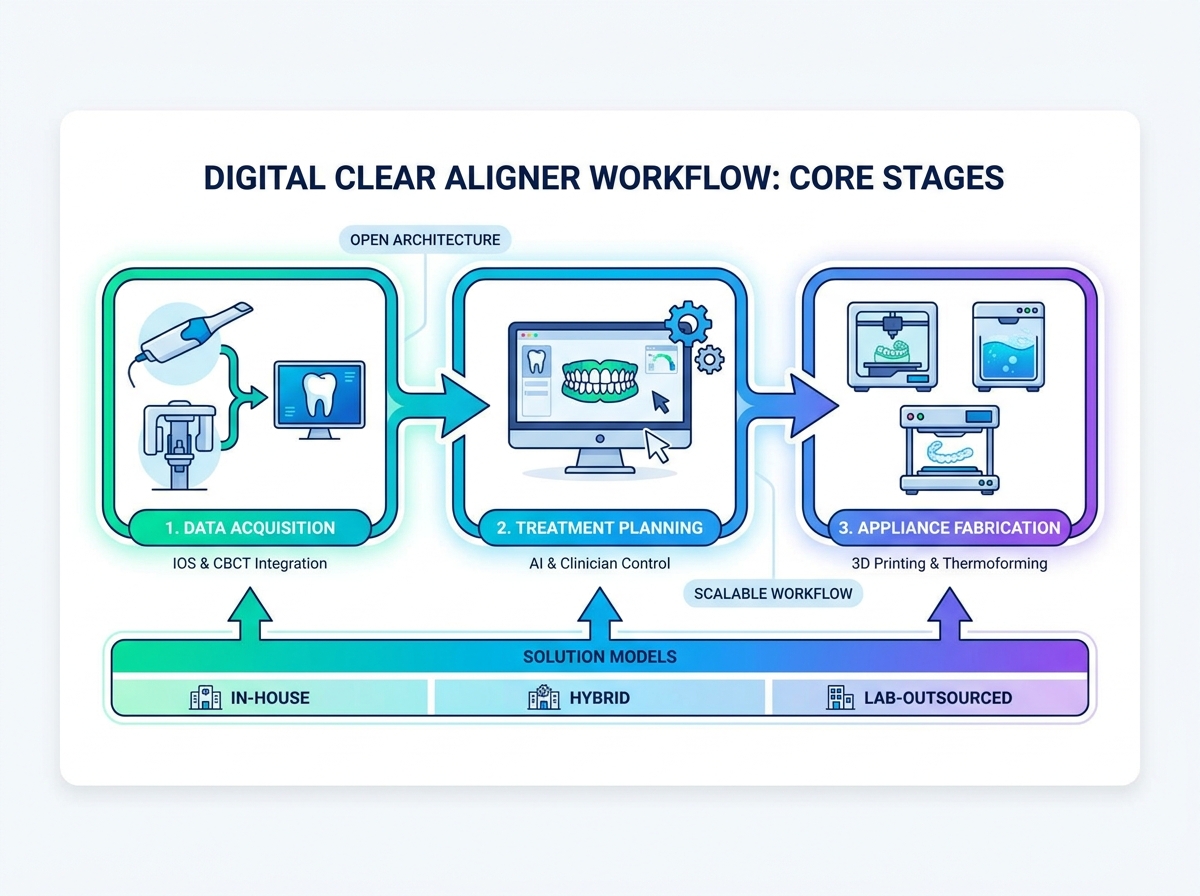
Building a reliable digital workflow requires careful selection across three primary stages. Each stage features unique evaluation dimensions. You must carefully assess the technology stack to ensure long-term clinical success.
The foundation of any digital case relies entirely on data acquisition. Intraoral scanners (IOS) capture the clinical crown and soft tissues. CBCT machines capture underlying bone and root structures.
When evaluating scanners, look at specific performance dimensions. Scanning speed directly impacts patient comfort and chairside efficiency. Focal depth determines how well the scanner captures deep interproximal spaces. Cross-arch accuracy ensures the virtual models align perfectly during bite registration. File openness is perhaps the most critical factor.
Requirement: Ensure the scanner seamlessly exports standard formats. Look for STL, PLY, and OBJ compatibility. You must avoid closed systems demanding per-scan export fees. Open formats allow you to route files to any laboratory or software platform.
Treatment planning software serves as the brain behind the clinical operation. Data acquisition merely collects information. Software transforms this information into actionable tooth movements.
Evaluate platforms based on AI-driven segmentation efficiency. The software should instantly separate individual teeth from gingival tissue. Examine manual override capabilities closely. Clinicians need absolute control over attachment generation and staging protocols. You must be able to adjust individual tooth velocity and anchorage points.
Requirement: Software must allow the clinician to dictate biomechanical principles. Avoid platforms forcing reliance on proprietary algorithms. Black-box systems cannot be audited clinically. If you disagree with an automated setup, you need the tools to override it completely.
The final stage brings the virtual plan into physical reality. This process typically involves 3D printing solid resin models and thermoforming plastic aligners over them.
Evaluation dimensions here focus heavily on hardware performance. Printer resolution, specifically XY accuracy, dictates how perfectly the aligner fits the patient's teeth. Print speed determines your daily manufacturing throughput. Resin compatibility defines your operational flexibility. Finally, automated post-processing reliability ensures consistent curing and washing.
Requirement: Scalable workflows require medical-grade, biocompatible resins. The systems must provide traceable batch parameters for compliance. You cannot compromise on washing and curing stations. Residual unreacted monomers pose significant health risks to patients.
Clinics must choose a production model aligned with their operational realities. No single model fits every practice. You must base your decision on case volume, available staff, and risk tolerance.
The fully in-house model involves scanning, planning, printing, and thermoforming completely within the clinic. You manage the entire supply chain.
Pros: You gain maximum control over turnaround times. A patient can literally receive their first aligners the next day. This approach offers the lowest cost per aligner because you only pay for raw materials. It also provides the ability to immediately replace lost or broken aligners without lab delays.
Cons: Prepare for high initial capital expenditure. You must purchase scanners, software, printers, and post-processing units. This model requires dedicated staff specifically for thermoforming, trimming, and polishing. Furthermore, the clinic assumes total liability for quality control and strict material compliance.
The lab-outsourced model keeps clinical data acquisition internal but pushes all planning and fabrication to a third-party laboratory.
Pros: You face zero hardware maintenance beyond your intraoral scanner. Clinics enjoy highly predictable per-case costs. You can leverage specialized technician expertise for highly complex orthodontic setups. It frees up your team to focus exclusively on patient care.
Cons: This model carries higher ongoing operational costs. Profit margins shrink as case volumes grow. You will face longer shipping and turnaround times. Potential communication bottlenecks frequently arise when collaborating remotely with external designers.
The hybrid model bridges the gap between total control and delegated labor. The clinician scans the patient and plans the treatment using in-house software. Once the digital setup is perfect, you export the files to a printing center or lab for fabrication.
Strategic fit: This model is ideal for practices wanting strict clinical control over the treatment setup. It completely avoids the labor-intensive realities of 3D printing, washing, curing, and manual thermoforming. You maintain biomechanical authority while delegating the messy manufacturing tasks.
Model Comparison Checklist:
Software selection ultimately defines your clinical stress levels. Bad software turns a highly profitable case into a frustrating ordeal. You must evaluate these platforms meticulously before signing contracts.
Modern software uses artificial intelligence to propose initial setups. However, AI often lacks nuanced biomechanical understanding. Evaluate whether the software acts as a "black box" or an open sandbox. You must be able to apply granular adjustments. Clinicians need tools to alter torque, tip, and staging velocity. If the software auto-resolves crowding by expanding the arch excessively, you must have the power to override this and plan interproximal reduction (IPR) instead.
Adult orthodontics rarely exist in a vacuum. Cases often involve worn dentition, implants, or periodontal compromise. Assess the software's ability to merge IOS surface scans seamlessly alongside DICOM data from CBCTs. This integration lets you evaluate hard bone limits. You can track actual root positioning during virtual simulations. This capability proves especially critical in complex adult ortho-restorative cases to prevent fenestrations.
Software pricing models vary wildly across the industry. Some companies offer Software as a Service (SaaS) subscription models. Others charge pay-per-case export fees. You must project your practice volume accurately. A pay-per-case model works wonderfully for clinics doing three cases a month. However, it quickly becomes cost-prohibitive for a clinic processing fifty cases monthly. Compare these models thoroughly to determine long-term operational sustainability.
Purchasing the technology represents only the first hurdle. True success depends entirely on how your team integrates these tools. Implementation carries specific risks you must address proactively.
The primary failure point in adopting a new digital workflow is simple staff friction. Humans naturally resist change. Plan explicitly for a 30- to 60-day learning curve. During this period, clinical efficiency temporarily dips. Dental assistants will take longer to scan a patient than they previously took to mix alginate. Do not panic. Support them through this phase. Provide structured training days without patient schedules. Once they build muscle memory, efficiency will skyrocket past analog baselines.
In-house manufacturing is not magic. It involves complex physical chemistry. Acknowledge that 3D printing involves failed prints occasionally. You will face resin management challenges. Post-processing errors frequently ruin perfectly printed models. Standard Operating Procedures (SOPs) are absolutely non-negotiable. Staff must know precisely how to filter resin. They must understand daily calibration requirements for the printer. They need strict timers for washing and curing stations to prevent appliance brittleness.
Printing appliances internally shifts your legal standing. In-house manufacturing effectively turns a standard dental clinic into a medical device manufacturer. You must understand local regulatory requirements completely. Ensure you only use FDA or CE-approved biocompatible resins. Maintain rigorous documentation for every printed batch. Log printer maintenance schedules, curing times, and material lot numbers. If a patient experiences an allergic reaction, your batch documentation serves as your primary legal defense.
A fully integrated digital system for clear aligner treatment fundamentally transforms clinical predictability. It also revolutionizes practice economics. However, this transformation only occurs provided the technology stack is open, highly scalable, and perfectly matched to your clinic's operational capacity. Making hasty purchasing decisions based on flashy marketing often leads to expensive equipment gathering dust.
Base your hardware and software decisions heavily on open architecture. Avoid closed ecosystems vigorously. Closed systems restrict future scaling and frequently force you to buy expensive proprietary consumables. Open systems guarantee you can pivot your strategy as technology evolves.
Audit your current monthly aligner volume immediately. Calculate your current lab expenditures. If your case volume justifies the capital expenditure, take action. Schedule technical demos prioritizing software usability and seamless scanner interoperability. Do not rush into full-scale production. Run a limited pilot program treating 5 to 10 straightforward cases. Validate your quality control procedures during this pilot before executing a full practice-wide implementation.
A: No. Modern workflows heavily favor "open architecture," allowing clinicians to pair any standard intraoral scanner with third-party planning software and agnostic 3D printers, reducing overall costs and vendor lock-in.
A: ROI timelines depend strictly on case volume and lab fee offsets. Practices converting 5-10 outsourced cases per month to an in-house model typically recover hardware CapEx within 8 to 14 months, assuming efficient staff allocation.
A: While not strictly required for simple aesthetic alignment, integrating CBCT data is increasingly the standard of care for complex movements to prevent fenestration, dehiscence, and root collisions, ensuring safer predictability.
A: Post-processing. While scanning and software planning are highly efficient, the physical printing, washing, curing, thermoforming, and manual trimming of aligners require dedicated, trained staff hours that are often underestimated during the purchasing phase.


