
- All
- Product Name
- Product Keyword
- Product Model
- Product Summary
- Product Description
- Multi Field Search
Views: 0 Author: Site Editor Publish Time: 2026-10-12 Origin: Site


Choosing the right intraoral scanner is an important step in building an efficient clear aligner workflow. Scan quality affects the digital models used for treatment planning, while software compatibility determines how easily a practice submits cases to an aligner provider.
Modern intraoral scanners offer different combinations of accuracy, scanning speed, software features, file export options, and service plans. However, no single device is ideal for every practice. The right choice depends on clinical needs, preferred aligner workflows, staff experience, and long-term technology plans.
This guide explains how to evaluate an intraoral scanner for clear aligners, compare open and closed systems, assess key hardware and software features, and estimate the total cost of ownership.
Key Takeaways
Scan quality: Evaluate full-arch performance, data completeness, and repeatability rather than relying on a single accuracy specification.
System compatibility: Confirm supported file formats and integration with your preferred aligner provider.
Clinical usability: Consider scanning speed, wand ergonomics, moisture handling, and staff training requirements.
Total cost: Include subscriptions, maintenance, hardware upgrades, and data storage in your budget.
Practical testing: Use clinical demonstrations to assess whether a scanner meets your workflow requirements.
Table of Contents
Clear aligner treatment relies on digital models that represent the patient's teeth and arch relationships. Local accuracy describes how closely a small area matches the actual anatomy. Full-arch accuracy evaluates how well the entire scanned arch is represented.
A scanner may capture individual tooth surfaces clearly but still accumulate errors across a longer scan. Performance can vary with arch shape, scanning technique, software processing, and clinical conditions.
When comparing scanners, evaluate:
Consistency across the entire dental arch.
Data quality around interproximal areas and posterior teeth.
Frequency of missing surfaces or tracking interruptions.
Repeatability under comparable scanning conditions.
Compatibility with your aligner provider's requirements.
Incomplete or distorted data may result in unclear tooth boundaries, missing interproximal surfaces, or discrepancies between the digital model and the patient's clinical condition. Review these issues before submitting a case.
There is no single deviation threshold that applies to every scanner and clinical task. Request technical documentation and, where possible, compare devices using the same test model and scanning protocol.
Saliva, blood, reflective enamel, and soft-tissue movement can affect optical scanning. Good moisture control and consistent scanning techniques help reduce incomplete data and tracking interruptions.
When evaluating a device, check whether it can:
Capture tooth surfaces under typical clinical conditions.
Maintain tracking along a consistent scanning path.
Recover easily after tracking interruptions.
Highlight missing areas for immediate correction.
Complete scans without excessive repositioning.
Most modern intraoral scanners are designed for routine use without traditional scanning powder. However, performance in wet or difficult-to-access areas varies by device and clinical conditions. Appropriate isolation, suction, and moisture control remain important.
Fast scanning can reduce chairside time, but speed alone does not determine clinical value. A rapid scan that requires extensive corrections may be less efficient than a slightly slower scan with complete, usable data.
During a demonstration, observe how the scanner performs around anterior curves, posterior teeth, and interproximal spaces. Check how easily the operator identifies missing data and completes the scan without restarting.
Ask the supplier to demonstrate the full workflow, including scan review, correction, export, and case submission. This provides a more realistic assessment than relying only on advertised scanning speeds.
System architecture affects how easily a practice transfers scan data between software platforms, laboratories, and aligner providers.
Open systems typically support exporting standard 3D files for use with compatible third-party software and laboratories. This can give practices more options when choosing aligner providers or expanding their digital workflows.
Potential advantages include:
Greater flexibility when working with different laboratories.
Easier transfer of compatible digital models.
More options for integrating dental technologies.
Less dependence on a single provider when suitable export options are available.
However, open file export does not guarantee compatibility with every platform. File requirements, data quality rules, software licenses, and submission procedures may still vary.
Some scanner ecosystems integrate hardware, software, and aligner submission workflows. These systems may simplify case transfer and provide a central support channel.
Potential advantages include:
A more streamlined submission process.
Integrated scanning and treatment visualization features.
Coordinated technical support.
Fewer manual steps when the workflow is fully supported.
The trade-off may include restrictions on certain exports, platform choices, or subscription features. These conditions vary by manufacturer and contract.
Before purchasing, confirm which files you can export, which providers accept them, and whether additional fees or subscriptions apply.
Evaluation Factor | Open or Export-Friendly System | Restricted or Integrated System |
|---|---|---|
File export | May support multiple standard formats | Some formats or functions may be restricted |
Provider choice | Depends on file and platform compatibility | May prioritize selected partners |
Workflow | May require manual file transfer | May offer more direct integration |
Technical support | May involve multiple vendors | May offer a central support channel |
Long-term flexibility | Depends on export rights and software access | Depends on platform policies and contract terms |
Neither system type is automatically better. Compare the actual export options, provider compatibility, and contract terms before deciding.
File compatibility is essential when transferring digital impressions to an aligner provider or treatment planning platform.
Common formats include:
STL: Stores 3D surface geometry and is widely used for dental models.
PLY: Can store geometry and, depending on the file, color information.
OBJ: Can store geometry and may include associated texture information.
The data included depends on the scanner's export settings and the receiving software. Color information is not always required for clear aligner manufacturing.
Before selecting a scanner, confirm the exact file formats required by your preferred provider. Check whether the system supports direct submission or requires manual downloads and uploads.
For more information about digital scan data and treatment workflows, read SmileyNova's guide to digital orthodontics.
Wand size, weight, tip design, and cable configuration can influence the scanning experience. These factors matter when capturing posterior teeth or treating patients with limited mouth opening.
Consider the following:
Whether the scanner tip can reach posterior areas comfortably.
Whether the wand feels balanced during a full-arch scan.
Whether cable drag affects operator movement.
Whether wireless models meet your battery and charging needs.
Whether scanning tips can be processed according to the manufacturer's infection control instructions.
Wireless scanners can improve freedom of movement, while corded models avoid battery-related interruptions. The better option depends on appointment volume, room setup, and working style.
Whenever possible, let the clinicians and dental assistants who will use the device test it before making a decision.
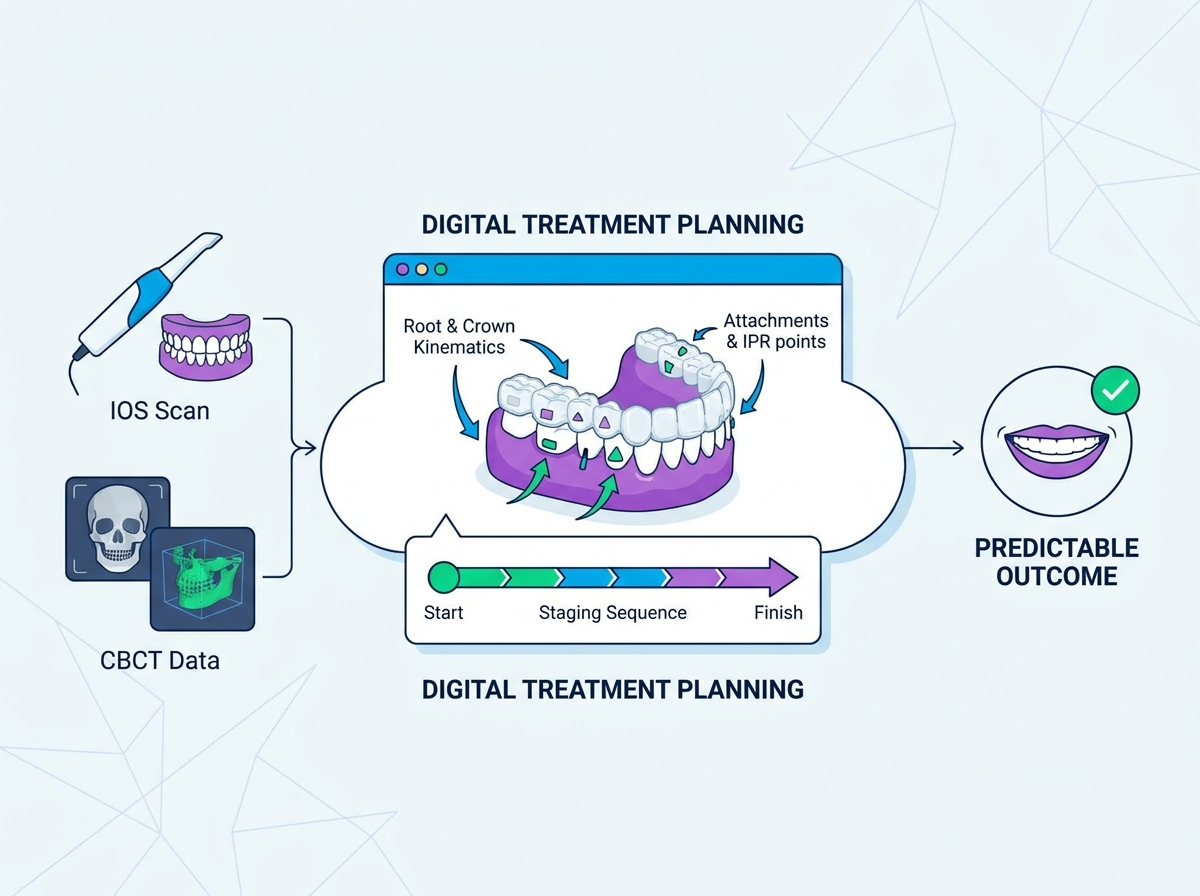
Some scanner systems include orthodontic simulation tools that display a proposed tooth arrangement. These features may help clinicians explain treatment options and discuss expected changes with patients.
However, a simulation does not guarantee the final clinical outcome. Actual tooth movement depends on diagnosis, biological response, treatment design, and patient compliance.
When evaluating these features, consider:
Whether the simulation is easy to access during consultations.
Whether clinicians can review and explain proposed movements.
Whether the software supports the practice's case submission workflow.
Whether advanced features require additional licenses.
Whether the visualization is clearly presented as a treatment simulation.
Learn more about the next stage in the process through SmileyNova's guide to clear aligner treatment planning.
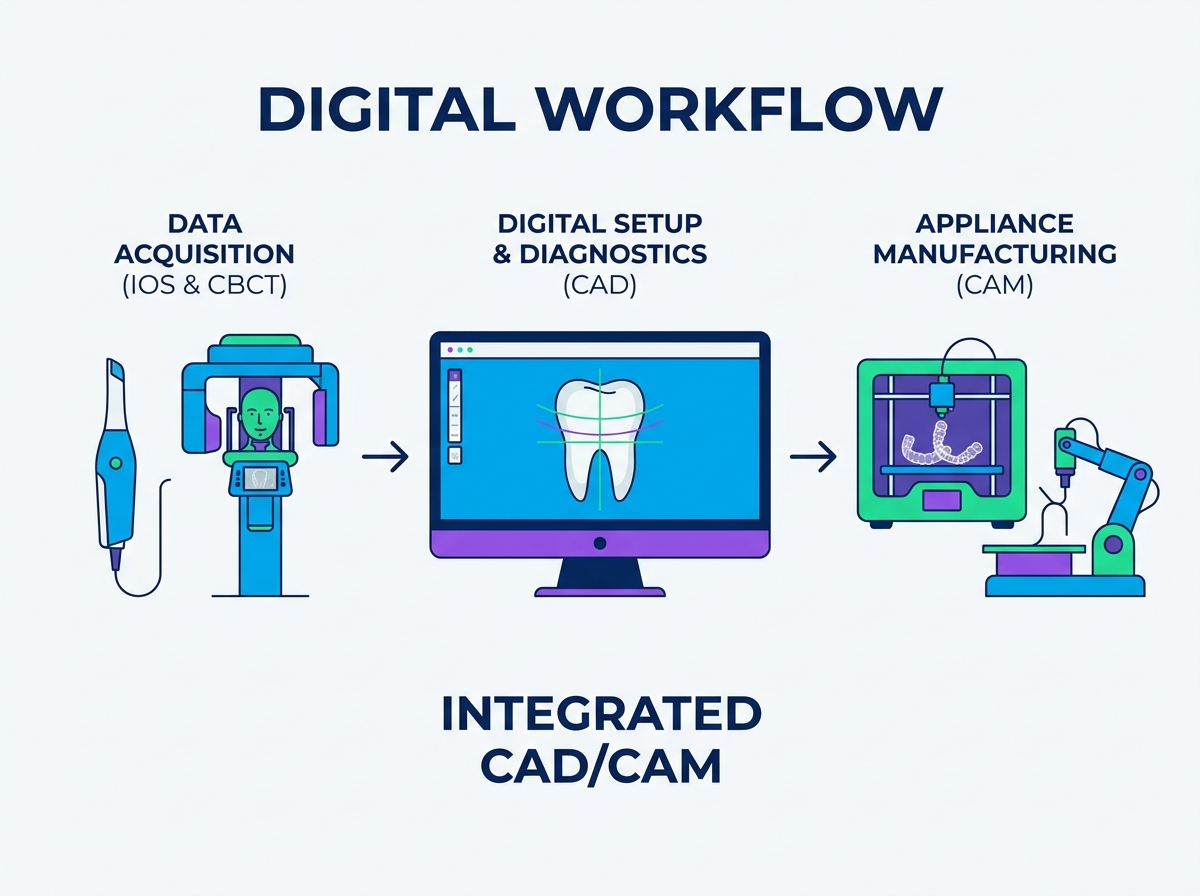
An intraoral scanner may support more than clear aligner cases. Depending on the software and available integrations, the same device may also be used for retainers, restorative workflows, study models, or other dental applications.
Before purchasing, determine which additional workflows your practice needs. Check whether the scanner supports the relevant software, file formats, and export functions.
A broader range of applications can increase the value of the device, but only when those functions fit your clinical processes.
The purchase price is only one part of the cost of an intraoral scanner. Software subscriptions, maintenance, training, replacement parts, and data storage can affect the long-term budget.
Cost Category | Questions to Ask |
|---|---|
Hardware | What is included in the purchase price? |
Software | Are updates and orthodontic tools included? |
Subscription | Are there recurring fees or feature restrictions? |
Maintenance | What are the warranty terms and repair costs? |
Training | Is onboarding included, and is further training available? |
Data storage | Are cloud storage or case submission fees charged? |
Integration | Are additional licenses or setup fees required? |
Downtime | Is a loaner device available during repairs? |
Compare these costs over the period you expect to use the scanner. Also confirm whether the software can continue operating if a subscription expires or the manufacturer's service terms change.
A scanner that is unavailable during repairs can disrupt appointments and case submissions. Review the service terms before purchasing.
Ask the supplier about:
Warranty duration and exclusions.
Repair turnaround times.
Availability of replacement equipment.
Software update policies.
Technical support hours and response procedures.
Costs for accidental damage or out-of-warranty repairs.
Request actual service terms in writing rather than relying on general promises of rapid replacement.

A practical demonstration is one of the most useful ways to compare scanners. It allows your team to evaluate performance under realistic conditions instead of relying only on marketing specifications.
During a demonstration, assess the following:
Full-arch capture: Can the scanner capture the required surfaces without repeated tracking loss?
Data completeness: Are interproximal and posterior areas sufficiently captured?
Correction workflow: Can missing areas be identified and rescanned easily?
File export: Can the required file format be exported successfully?
Provider compatibility: Can a test case be submitted to your intended aligner provider?
Software usability: Can staff review, save, and transfer scans without unnecessary steps?
Ergonomics: Can operators use the wand comfortably throughout a typical appointment?
Support: Are training, maintenance, and troubleshooting procedures clearly documented?
Where possible, compare two or more scanners using the same test model and similar scanning conditions. Record scan completion, data quality, export success, and operator feedback.
Scanner performance depends partly on operator technique. Staff need to understand the recommended scanning path, tracking recovery, moisture control, and final data review.
A structured onboarding plan should include:
Review the manufacturer's training materials.
Practice the recommended scanning path on a model.
Complete supervised scans on suitable patients.
Review exported files and correct missing data.
Test the full case submission workflow.
Monitor scan quality and recurring problems during early use.
Training time varies by device and operator experience. Evaluate staff readiness through observed performance rather than assuming a fixed learning period.
Technology failures can happen even with reliable equipment. Practices should have a clear process for missed scans, repair requests, and urgent case submissions.
Depending on clinical needs and available resources, a backup plan may include access to another scanner, referral to a nearby provider, or suitable conventional impression materials.
Choosing the right intraoral scanner for clear aligners requires more than comparing advertised speed or accuracy figures. Practices should evaluate full-arch scan quality, data completeness, file compatibility, software features, wand ergonomics, and long-term costs.
Open systems may offer greater flexibility, while integrated systems may simplify specific workflows. Neither option is automatically better for every practice. The decision should reflect preferred aligner providers, existing technology, staff capabilities, and future plans.
Before purchasing, request a practical demonstration, verify file export and case submission, review the service agreement, and involve the team members who will use the scanner. A well-matched system can support a more consistent digital workflow and help your practice manage clear aligner cases efficiently.
Evaluate full-arch scan quality, data completeness, file compatibility, scanning ergonomics, software features, and ongoing costs. A practical demonstration can help determine whether the device meets your workflow requirements.
Not necessarily. Open systems may provide greater file and provider flexibility, while integrated systems may simplify case submission and support. Check export options, compatibility, subscription terms, and contract restrictions before choosing.
STL is widely used for 3D dental geometry. PLY and OBJ can also carry color or texture information, depending on the export. Always confirm the exact format and file requirements with your aligner provider.
Most modern intraoral scanners are designed for routine scanning without traditional powder. However, moisture control, scanning technique, and device performance still affect data quality.
Test the devices using a consistent protocol. Assess full-arch capture, missing data, ease of correction, file export, provider compatibility, ergonomics, and support terms. Involve the staff who will use the scanner in the evaluation.


